
See what worked. Know what to practice next.
Understand more than your final score. Review what went well, revisit important holes, and compare the shots you planned with the results. Replay those moments and share a PDF with your coach to decide what to practice next.
Inside the report
How to read your post-round report.
After you complete a simulated round, Jetta turns your recorded shots into a coaching review. Start with the summary, then explore the details behind it. The sections below explain what you may find; some appear only when there is enough information.
01
Your round
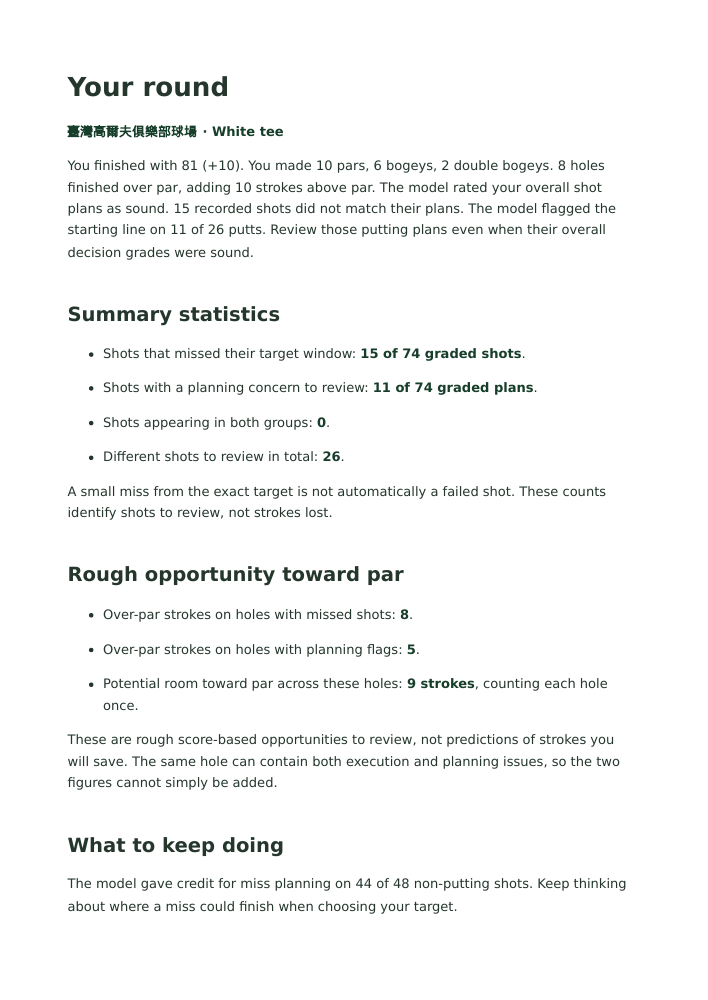
See your score, how you scored across the holes, and the main lessons from the round. This overview helps you choose where to look more closely.
02
Summary statistics
See how many shots missed their expected target area, how many plans deserve another look, and how many shots fall into both groups. The total counts each shot once, even if it has more than one concern.
03
What to keep doing
Recognize good habits shown in your recorded shots, such as leaving room for a miss. Knowing what worked is just as useful as knowing what needs attention.
04
What happened
Read explanations of important holes, then select Review Hole to examine the shots and replay. Your scorecard and complete shot list provide the rest of the story.
05
Patterns worth reviewing
Look for concerns that appear repeatedly in similar situations. Jetta needs enough examples before highlighting a pattern. One poor shot or a low category score alone is not enough.
06
Your next step
Choose a practice focus or a question to discuss with your coach. If the round does not provide enough information for a specific recommendation, the report tells you.
Understand the plan before judging the result.
You can choose a sensible club and target, then hit a shot that misses the expected area. You can also choose a risky plan and get a good result. Jetta reviews your plan separately from how the simulated shot turned out, so you can understand both parts of the play.
The review explains your recorded score and shot grades without changing them.
Read the numbers
Understand the opportunity-toward-par estimate.
The report may include a section called Rough opportunity toward par. It adds up strokes above par on completed holes that contain shots or plans worth reviewing. Each hole counts once, even if several shots on that hole need attention.
For example, a bogey on a par 4 contributes one stroke to this total. That points you toward a hole to review; it does not mean the identified concern caused the bogey or that you could have saved that stroke. Jetta leaves this estimate out when the recorded scores do not agree.
Review with your coach
Bring your review to the next lesson.
Read the report on screen or download a PDF to discuss with your coach in person or during a video meeting. You can also download a JSON file, which stores the detailed report data and references to the recorded shots.
Choose an important hole, discuss what you intended and what happened, and agree on one practical next step. The report helps you ask better questions, but it cannot diagnose a swing fault.
See how one round fits into your longer-term progress.
Your post-round report focuses on a single round. Player Learning, available in your account, looks across completed rounds for strengths and recurring decisions. Check how many examples support each finding. When there are too few, Jetta tells you it is still collecting enough information.
Want to review a round you played on the course?
The reports described above review simulated rounds. To revisit a real round, use GPS on-course replay after your completed round has uploaded. You can examine recorded locations, clubs, results, and any saved targets or plans. GPS records show where the ball finished, but cannot explain your clubface position, swing path, or quality of contact.
Learn how to record an on-course round · Explore PC On-Course Replay
Example report
See a complete post-round review.
This two-page example shows a simulated round with a score of 81, or 10 over par. It identifies 15 shots that missed their expected target area and 11 plans worth reviewing. No shot appears in both groups, so there are 26 different shots to revisit. These counts do not represent strokes lost.
Open the full PDF to see the golfer’s strengths, important holes, and a suggested review of putting plans. It also explains the opportunity-toward-par estimate and offers a starting point for a conversation with a coach.